
 Image 1 of 2
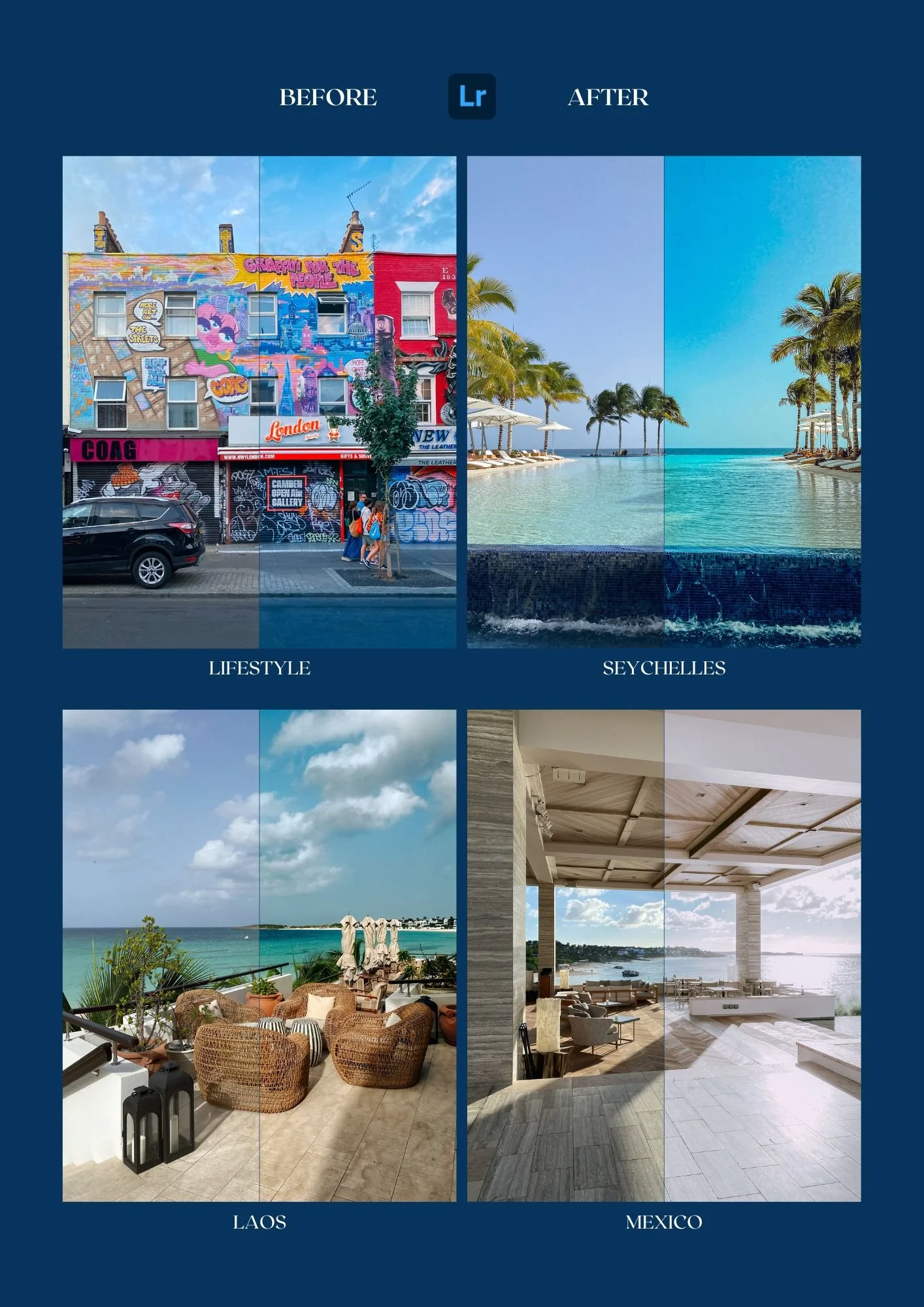 Image 2 of 2
Benefits
✔️ One-time purchase, lifetime use — no subscriptions, ever.
✔️ Perfect for travel photos — make your memories pop instantly.
✔️ For all creators — works on both Lightroom Mobile (free app) + Lightroom CC Desktop.
✔️ Pro-level editing made simple — crafted by Jonathan @JAustinPro, with years of experience in photography, color grading, and storytelling.
What’s Inside
The Lifestyle Collection includes 4 custom presets:
Laos – warm, earthy tones with balanced highlights
Lifestyle – clean, natural colors for everyday edits
Mexico – bold contrasts with a sunlit pop
Seychelles – airy, tropical vibes with bright blues and greens
Why Creators Love It
Whether you’re a traveler, content creator, or someone who just wants better photos for Instagram, this preset pack will save you editing time while making your feed look polished and professional.
How It Works
Download instantly after purchase
Import into Lightroom (mobile or desktop)
Apply with one click and fine-tune to your liking
Notice: Please note that not all presets will look good with every photo, please experiment with different presets and you can also edit the preset to get the best results.